
 EN
EN TH
TH CN
CN
Many people probably struggle with calculating percentages in various ways, as percentage calculations can be difficult for some. However, if you have a basic understanding of arithmetic and the right tools, using formulas and methods to calculate percentages won’t be a difficult task anymore. This article provides several methods for calculating percentages that anyone can easily follow. Let’s read along together.
Table of Contents
1. How to Calculate Percentage Difference?
2. Easy Percentage Calculation with a Calculator
3. How to Calculate Discount Percentages
4. Calculating Salary Percentage with a Calculator
5. Calculating Commission Percentages with a Calculator
6. Calculator: Profit/Loss Percentage Calculation
How to Calculate Percentage Difference?
The percentage difference calculation is a method used to determine the change between two numbers, quantifying how much they differ, and expressing it as an average, denoted by the percent sign (%). This method helps to understand the proportion of change between numerical values greater than 0. It measures the difference between two values, showing whether it’s an increase or decrease, expressed as a percentage in various forms. Fundamentally, it divides the result by the average of the two values and then multiplies by 100 to obtain the percentage difference.
The basic formula commonly used to calculate the percentage difference is:
((|Value A| – |Value B|) / |Value A|) * 100 = Result: Average Percentage Difference
And importantly, don’t forget to take the absolute value of the difference to ensure the percentage is always a positive value.

Easy Percentage Calculation with a Calculator
Calculating percentage difference can be divided into two main scenarios: finding the percentage increase and finding the percentage decrease.
The basic formulas for both scenarios are as follows:
- For percentage increase: Divide the difference by the smaller number (this is commonly used to calculate profit percentage).
- For percentage decrease: Divide the difference by the larger number (this is commonly used to calculate loss percentage).
The specific calculation method for each case depends on the “base” number – whether it’s larger or smaller than the number being compared to find the difference (increase or decrease). The term “base” refers to the original value before any change occurred.
In other words:
- If the “base” number is smaller than the number it’s being compared to, the result will represent a percentage increase.
- If the “base” number is larger than the number it’s being compared to, the result will represent a percentage decrease.
Example: You have a cost of 500 Baht and sell a product for 800 Baht.
Therefore, the “base” number, or the “original value,” used for calculating the change in this example is 500 (the cost price).
How to Calculate Discount Percentages
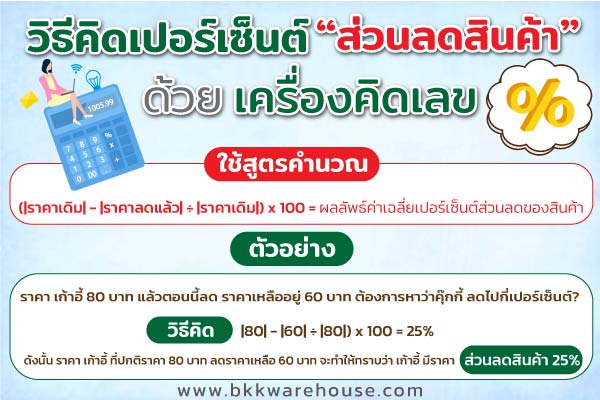
To calculate the percentage discount on a product, you need to know the original price of the item and the discounted price. Then, use the following formula:
(|Original Price| – |Discounted Price| ÷ |Original Price|) x 100 = Discount Percentage
For example: A chair was originally priced at 80 Baht, and it’s now on sale for 60 Baht. How much is the discount percentage? Here’s how to calculate it:
Step 1: Find the difference between the two prices.
- 80 – 60 = 20
Step 2: Take the result from “Step 1” and divide it by the base number, or the original price. In this case, we want to find out what percentage of the original price the discount represents. Therefore, the original price before the discount is 80 (so we divide by 80).
- 20 ÷ 80 = 0.25
Step 3: Multiply the result by 100.
- 0.25 x 100 = 25%
Therefore, the chair, which was originally priced at 80 Baht and is now discounted to 60 Baht, has a discount percentage of 25%.

Calculating Salary Percentage with a Calculator
To calculate the percentage increase in salary, you need to know the new salary amount and the old salary amount. Then, use the following formula:
(|New Salary| – |Old Salary| ÷ |Old Salary|) x 100 = Average percentage increase in salary
For example: A company adjusts the new salary to 20,000 baht. The old salary was previously 17,000 baht. You want to find out what percentage the salary has increased by. This can be done by:
Step 1: Find the difference between the two amounts.
- 20,000 – 17,000 = 3,000
Step 2: Take the result from “Step 1” and divide it by the base number, or the old salary. In this case, we are finding out what percentage the salary increased by. Therefore, the original salary before the increase is 17,000 (so, we will divide by 17,000).
- 3,000 ÷ 17,000 = 0.17
Step 3: Take the result and “multiply” it by 100.
- 0.17 x 100 = 17%
Therefore, the new salary of 20,000 baht is an increase from the original salary of 17,000. The increased of the salary is 17%.

Calculating Commission Percentages with a Calculator
To calculate the commission percentage, you need to know the price of the goods and the commission rate. Then, you can use the following formula:
(|Price of goods| x |Commission percentage|) ÷ 100 = Commission amount
For example: A salesperson will receive a 3% commission because they closed a car sale of 350,000 baht this month. To find out how much commission they earned from the sale, you can do the following:
Step 1: First, find the product of the two numbers using a calculator.
- 350,000 x 3% = 10,500,000
Step 2: devide the product that you get from step 1 by 100.
10,500,000/ 100 = 10,500 baht.
- 350,000 x 3 = 1,050,000
Step 2: Take the result from the first step and “divide” it by 100.
- 1,050,000 ÷ 100 = 10,500 Baht
Therefore, the salesperson closed a car sale of 350,000 baht and earned a 3% commission, which is equal to 10,500 baht.

Calculator: Profit/Loss Percentage Calculation
Let’s start by calculating profit percentage. First, you need to know the cost price of the goods and the profit from the sale. Then, you can use the following formula:
(|Profit| ÷ |Cost Price|) x 100 = Average Profit Percentage
Example: A merchant buys shirts to sell. The cost per shirt is 300 baht. They sell them at the market for 450 baht, making a profit of 150 baht per shirt. We want to find out what the average profit percentage increase is. Here’s how:
- Step 1: Find the difference between the two amounts using a calculator:
150 ÷ 300 = 0.5 - Step 2: Take the result from Step 1 and multiply it by 100:
0.5 x 100 = 50%
Therefore, the merchant who bought shirts for 300 baht each and sold them for 450 baht made a profit of 150 baht per shirt, or a 50% profit on the cost.
Calculating Loss Percentage
This section will cover how to calculate the loss percentage. First, you need to know the cost price of the goods and the selling price. Then you can use the formula:
(|Loss Amount| ÷ |Cost Price|) x 100 = Average Loss Percentage
Example: You bought a hat for a cost price of 450 baht. A close friend asks to buy it from you for 300 baht. You have a loss of 150 baht. We want to know what percentage the loss is. This can be down by:
- Step 1: Find the difference between the two numbers using a calculator.
150 ÷ 450 = 0.33 - Step 2: Take the result from the first step and multiply by 100.
0.33 x 100 = 33%
Therefore, buying the hat at a cost of 450 baht and sell it to your friend for 300 baht causes a loss of 150 baht. If considered as an average, it means that there’s a loss of 33% of the cost of goods.
Conclusion
In summary, we’ve shared methods for calculating percentages and various calculation formulas. Anyone using a calculator can easily understand and follow these steps. Simply follow the calculation methods we’ve provided in this article, and finding percentage differences will no longer be a complicated matter.
Recommended articles
What is inventory? Understanding inventory in business operations.
Read the contentMar
What is a distribution center? A key component of modern logistics.
Read the contentMar
What’s a warehouse? Why it matters. Types & Functions explained.
Read the contentFeb
What is purple zone land? Ideal uses and information. Check here!
Read the contentFeb
Land survey fees. Costs, steps, docs. Must-know before land deals.
Read the contentJan
GMP. What is it? Importance, users, and a simple business guide.
Read the contentNov